https://www.datahubconsulting.co.uk/articles/from-purview-to-the-onelake-catalog/
DataHub Consulting, Experts in Analytics, Business Intelligence, and Compliance 1200627
From Purview to the OneLake catalog
DataHub Consulting, Experts in Analytics, Business Intelligence, and Compliance310310
A transition guide: what Microsoft’s data governance shift means for your organisation, and how to plan the move
On 12 November 2026 Microsoft announced that Purview Data Governance will be retired, and that Microsoft Fabric, built around the OneLake catalog, is now its data governance product. Purview itself stays, refocused on data security and compliance. This guide explains what changes, what your destination looks like, and how to move from Purview to the OneLake catalog step by step over the next twelve months.
As new technology evolves with data platforms this inevitably means that organisations need to review their architecture and plan any migration. With the Microsoft platform this is the case and this month there is a big move for organisations using Purview.
If you have spent the last couple of years setting up governance domains, glossary terms and data products in the Purview Unified Catalog, the announcement probably left you thinking what to do. You now have a year to plan a migration. If you are earlier in your governance journey, it is arguably good news; the decision about where governance should live has just been made for you.
I’ve worked with Microsoft data platforms since 2007, and I also lead our data protection audits at Datahub. So, I read Microsoft’s announcement twice. The first time as a Fabric engineer, nodding along, because putting governance next to the data makes a lot of sense. The second time as an auditor, with a slightly sinking feeling, because I know how much compliance evidence quietly ends up living in a governance catalogue without anyone ever deciding it should.
This guide is written for both of those readers. It’s for the data platform lead who has to redesign domains, tags, and access in Fabric, and for the DPO, CDO or compliance lead who needs to know that the organisation’s accountability story still stands once the old tooling is gone. Product announcements and technical descriptions are based on Microsoft’s announcement, transition guidance and Microsoft Learn. The governance recommendations and proposed roadmap are ours; the data protection discussion also needs to be read alongside applicable legislation and current regulator guidance.
How to use this guide
The guide is in four parts:
Part 1 explains what Microsoft has changed and why.
Part 2 describes your destination: the OneLake catalog, what Purview keeps, and how each Purview capability maps across.
Part 3 is the transition itself, set out as five steps with the activities, outputs and checks for each.
Part 4 covers the twelve-month roadmap, common questions and how Datahub can help.
PART 1
Understand the change
What changed on 12 November
The announcement came in a Microsoft Security Community blog post titled “A next step in the evolution of the Microsoft Data Governance strategy”. Its central message is simple. Microsoft’s commitment to data governance hasn’t changed. Where governance lives will change.
In Microsoft’s next chapter, its governance strategy will be built natively into Microsoft Fabric, with the OneLake catalog as the foundation for governing data across an organisation’s estate. Purview Data Governance is being retired, and support will end a year from the announcement, on 12 November 2027.
Microsoft planning guidance for Purview data governance now opens with a retirement notice. It confirms that the Microsoft Purview Unified Catalog and classic Microsoft Purview data governance (formerly Azure Purview) are being retired, that you can no longer create new accounts. Existing capabilities stay in maintenance mode until 12 November 2027.
Here are the essential key facts in one place:
What retires: Purview Data Governance, meaning the Unified Catalog and classic Purview data governance, including Data Map scanning.
When: support ends on 12 November 2027. Until then, existing capabilities are in maintenance mode.
New accounts: no longer possible.
What replaces it: Microsoft Fabric, with the OneLake catalog at its centre.
What stays: Microsoft Purview itself, refocused on data security and compliance.
Billing: governance in Fabric is included in Fabric capacity rather than charged through separate meters.
Regulated organisations: customers with contractual obligations, or in highly regulated industries, are asked to contact their Microsoft account team early, and Microsoft says those cases will be assessed individually.
Governance moves, compliance stays
This is the single most important thing to understand about the announcement, and it’s easy to misread the headlines. Microsoft Purview is not being retired. Purview Data Governance is. Microsoft has split what Purview used to do into two jobs and given each a clear home.
Data governance, meaning cataloguing, curating, describing and finding data, moves into Microsoft Fabric and the OneLake catalog. Data security and compliance stay in Microsoft Purview. In Microsoft’s words, Purview stays focused on classifying, labelling and protecting sensitive data, preventing data loss across the estate and AI, and keeping up with changing compliance requirements. Microsoft also says it will keep investing in Purview’s integrations with Microsoft 365, Azure and Fabric.
For a Fabric estate, four sets of compliance capabilities are retained in Purview:
Information Protection. Sensitivity labels apply to all Fabric items, with protection maintained on supported export paths (additional licensing required).
Data Loss Prevention. DLP evaluates labels and sensitive information types on structured data in lakehouses, warehouses, databases and semantic models, with policy tips and alerts (additional licensing required).
Audit and Insider Risk Management. Fabric user activities are logged in the Purview audit log, and Insider Risk Management has ready-made risk indicators for Power BI and lakehouse activity.
AI governance. Risk discovery in prompts and responses, audit of AI interactions, and retention and eDiscovery for AI-generated content in supported Copilots and agents.
Set side by side, the split looks like this:
Moving to Fabric and the OneLake catalog (governance)
Staying in Microsoft Purview (security and compliance)
Catalogue search and discovery
Sensitivity labels and Information Protection
Governance domains and ownership
Data Loss Prevention
Glossary terms and critical data elements
Audit log
Data products
Insider Risk Management
Data quality and health management
AI governance for Copilots and agents
Data Map scanning and lineage
Access requests and governance workflows
Table 1. What moves and what stays. Source: Microsoft announcement and transition guidance, November 2026.
Microsoft’s own summary is a good one to quote internally: the OneLake catalog remains the primary experience for governing Fabric data, and Purview adds protection, audit, risk and compliance coverage where needs extend beyond Fabric.
There is one catch, and as an auditor, I’d be failing you if I didn’t mention it. The compliance tools stay, but some of the evidence that supports compliance has been living on the governance side, and that part is moving. Glossary classifications that show where personal data sits, lineage used for DPIAs and erasure requests, and access approval workflows are all examples. We treat this as its own workstream in Part 3.
On 13 November, the day after the announcement, Microsoft’s Analytics on Azure blog published “From Purview Data Governance to the Fabric OneLake Catalog”. This is the more practical of the two posts, and the one I’d encourage every data platform lead to read in full. It explains how the OneLake catalog works, maps Purview outcomes to Fabric capabilities, names the gaps honestly, and sets out five migration steps. This guide is built around those steps.
Why this isn’t a crisis
It’s worth saying clearly: none of this touches your data. Microsoft’s own documentation is explicit that everything in the Data Map and Unified Catalog is metadata, and that no permission or role in either grants access to the underlying data. Your lakehouses, warehouses and semantic models stay exactly where they are.
Your security posture doesn’t change on day one either. Sensitivity labels, Data Loss Prevention and audit all remain in Purview.
And why it isn’t trivial
What is affected is your governance programme. The definitions people agreed, the owners they named, the products they curated, the workflows they built. That work has real value, and it has a habit of living in places nobody has written down. A Power BI report built on glossary coverage. A Power Automate flow that routes access requests. A script that exports assets to a spreadsheet for the audit committee. A good transition finds all of it, decides what happens to each piece, and moves it deliberately rather than discovering the gaps in November 2027.
How we got here
Azure Purview was built for a world where data was everywhere: SQL Server, Azure SQL, Synapse, data lakes, and plenty of non-Microsoft systems besides. Its model was the classic enterprise catalogue. You registered sources, scanned them on a schedule, and built an inventory of technical metadata in the Data Map. Microsoft Learn still describes the Data Map as the technical layer, built by scanning data sources to create an inventory.
The Unified Catalog then added a business-facing layer on top. Microsoft describes it as the place where data stewards curate data and consumers find it, building a marketplace of data products over the Data Map inventory. Governance domains, data products and glossary terms gave many organisations their first taste of governance as a business programme rather than an IT spreadsheet. That deserves acknowledging before we talk about moving away from it.
Meanwhile, Microsoft Fabric changed how data can be made available for analytics. OneLake became the single logical lake for an organisation. Shortcuts can provide access to data in place, while database mirroring replicates data into OneLake; metadata mirroring instead synchronises metadata and uses shortcuts. Over the past year the overlap became obvious. The Fabric security reports that used to live in the Purview Hub moved into the OneLake catalog’s Govern tab, and Microsoft said it would remove the Purview Hub report by the end of January 2026.
Anyone who has run both will recognise the symptoms. A new lakehouse table shows up in Fabric immediately but only appears in Purview after the next scan. An endorsement in Fabric and a data product in Purview describe the same asset in two different vocabularies. Stewards have two places to curate. Consumers have two places to search. The November announcement settles that duplication in Fabric’s favour.
Why Microsoft is making the change
Microsoft’s rationale boils down to one line from its announcement: governance works best when it isn’t a separate stop. There are four arguments underneath that.
Two systems slow everyone down. Microsoft says customers told it that a separate catalogue forces every policy, label and lineage update to bridge two systems. Bringing governance into Fabric reduces that duplication and keeps technical context closer to the data. It does not make governance complete automatically: teams still need to assign domains and accountable owners, configure labels and maintain business descriptions. Nor is every view instantaneous; Govern insights use refreshed monitoring data rather than a live view of every change.
The data is already consolidating in OneLake. Microsoft points out that many organisations are already bringing data together in OneLake through shortcuts and mirroring from multi-cloud and on-premises sources, and that most Purview data governance customers already use Fabric. These patterns make supported external data available through Fabric, but they do not all work without copying: database mirroring replicates data, while shortcuts and metadata mirroring can leave it in place. Assess discovery, lineage and enforcement for each source and access path rather than treating connectivity as equivalent to enterprise metadata scanning.
AI agents need governed context. This is the argument I find most compelling. As Microsoft puts it, agents need to know what data means, who can use it, and whether it’s trustworthy. Permissions enforce access on supported paths; labels, endorsements, descriptions and lineage provide additional protection or trust context according to the integration. Microsoft describes OneLake catalog experiences in Teams, Excel and Copilot Studio, and integration with Foundry. The Catalog Search REST API also supports programmatic metadata discovery across workspaces. Good table and column descriptions can improve the context available to supported AI experiences, but the metadata used and the identity under which queries run depend on the agent and its configuration. Test both access and answer quality in your actual use case.
Governance shouldn’t need its own budget line. Governance in Fabric is included in Fabric capacity rather than billed through separate meters. One caveat: some Purview protection capabilities used with Fabric, including label-based protection on export and DLP, need additional licensing. “Included” applies to the catalog, not to everything around it.
PART 2
Know your destination
A tour of the OneLake catalog
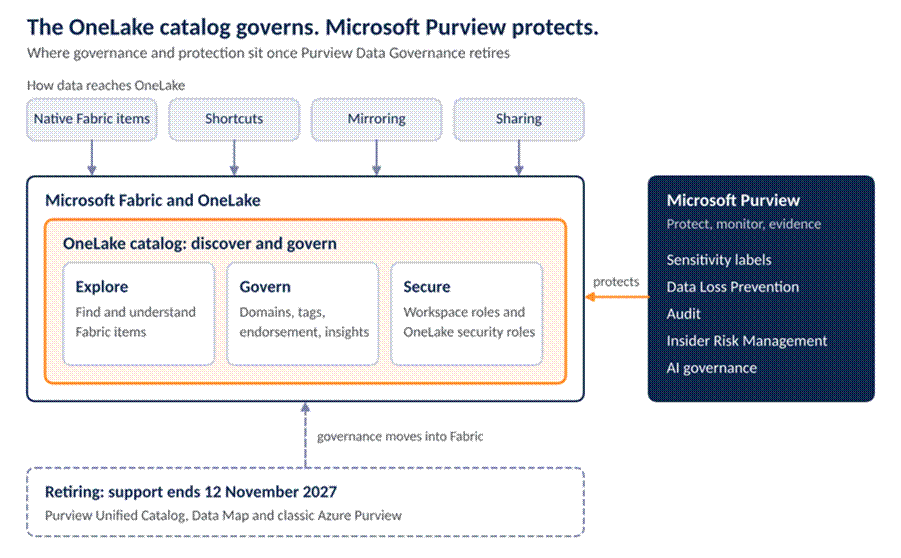
Figure 1. Where governance and protection sit once Purview Data Governance retires. Based on Microsoft’s announcement and transition guidance.
You open the OneLake catalog from the OneLake icon in the Fabric navigation pane, and it lands on the Explore tab. Microsoft Learn describes it as Fabric’s central place to discover data, understand governance status and manage security. It’s organised into three experiences: Explore, Govern and Secure. A fourth capability, Fabric Policies, is managed from Govern and is currently in preview. Microsoft’s transition post explains that data reaches OneLake in four ways: created natively in Fabric, through shortcuts, through mirroring, and through sharing.
Explore: find and understand
Explore is the default tab and the one most of your users will live in. It has an item list with an in-context details view, filters including by domain, and the ability to work across several workspaces side by side. One thing to understand early: Microsoft describes Explore as permission-trimmed and focused on Fabric items. It isn’t an inventory of every external source in your estate, which is what Purview’s Data Map set out to be.
Govern: understand health and act
Govern is where Purview’s health management finds its nearest equivalent. Governance Insights show where your data stands, and Recommended Actions suggest what to do about it. There are two views, all data in Fabric for administrators and “my items” for data owners, and both can be scoped to a domain or subdomain. The estate-level report has three tabs: Manage the data estate; Protect, secure and comply, which shows sensitivity label coverage and DLP evaluation; and Discover, trust and reuse, which looks at freshness, curation, descriptions, endorsement and sharing.
Govern is also where the building blocks live: domains, tags, endorsement, metadata scanning, cross-tenant sharing discovery and policies. Microsoft is progressively moving admin experiences here from the Admin portal too, covering capacities, workspaces, tenant configuration, Azure connections and workloads.
Secure: see and manage access
Secure gives you a unified view of workspace roles and OneLake security roles across items. Admins can review access, audit permissions, and create, edit or delete security roles from one place. Answering “who can read this table?” used to mean checking several screens. Now it’s one.
Fabric Policies (preview)
Fabric Policies are condition-based rules activated at tenant or capacity scope, using attributes such as workspace, security group, sensitivity label and item type, with enforcement decisions recorded in the audit log. The preview is deliberately narrow. The only rule effect is Allow, but a policy with rules acts as an allow list: an action that matches no rule is blocked. A policy without rules uses the policy’s default behaviour. Three scenarios are supported: external data sharing at tenant level, item creation at capacity level, and editing workspace settings at tenant level. There’s one active policy per scope, with up to 100 rules at tenant level and 50 at capacity level, and changes can take up to fifteen minutes to apply.
For UK and European readers, one detail matters a great deal. Microsoft says Fabric Policies are not currently supported in the West Europe, North Europe or West US capacity regions. For many organisations, that makes policies something to watch rather than something to design around today. What I do like is that policies are stored as Fabric items and support REST APIs, Git and CI/CD. That’s governance as code.
What Purview keeps
We summarised the four retained capability areas in Part 1. Here is a little more on each, as Microsoft’s transition guidance describes them for a Fabric estate.
Information Protection. Sensitivity labels apply to Fabric items, with protection maintained on supported export paths. Fabric also lets domain admins configure a default sensitivity label where the domain-level feature is enabled. That default is applied when an item is created and saved, or when an existing item is updated and saved, subject to label precedence rules; it is not an immediate bulk relabelling of the domain. Nor does a default label discover sensitive columns. If you relied on Purview scanning for discovery and classification, define and validate a replacement discovery process as well as a labelling policy.
Data Loss Prevention. Purview DLP evaluates labels and sensitive information types on structured data in lakehouses, warehouses, databases and semantic models, raising policy tips and alerts.
Audit and Insider Risk Management. Fabric user activities are logged in the Purview audit log, and Insider Risk Management includes ready-made risk indicators for Power BI and lakehouse activity. For anyone with a regulatory duty to show who accessed what and when, the audit log remains the evidence backbone.
AI governance. Purview continues to cover risk discovery in prompts and responses, auditing of AI interactions, and retention and eDiscovery for AI-generated content in supported Copilots and agents.
During the transition, Purview’s live view (preview) can expose accessible Fabric workspaces and item-level metadata without a configured scan, subject to its documented limitations. However, live view is documented within the retiring Purview data governance capabilities and carries the retirement notice. Do not treat it as a confirmed post-retirement destination for Fabric metadata; validate and replace any process that depends on it.
How each Purview capability maps across
Microsoft’s transition guidance maps Purview Data Governance by outcome rather than by product name. Some outcomes move almost one to one. Others need a design decision. A few have no direct equivalent in the OneLake catalog at all. This table is the backbone of your transition plan.
Purview outcome
Where it goes in Fabric
Fit
Microsoft’s note
Catalogue search and browse
OneLake catalog Explore, filters, Catalog Search API
Close
Fabric items only; keep separate discovery for external sources
Collections, domains, ownership
Fabric domains and subdomains, workspace assignment, domain admins, owners
Close
Keep a responsibility matrix for stewardship
Health management
Governance Insights and Recommended Actions
Close
Keep business KPIs and issue closure in owning systems
Glossary, critical data elements, custom context
Tags, descriptions, endorsement
Redesign
Export and preserve terms; no full glossary or CDE parity
Define product contract, lifecycle and access process outside the catalog where needed
Data quality
Freshness and curation insights; workload and source tools
Redesign
Not a rules, profiling or scoring engine
Access requests and workflows
Item sharing, semantic model access requests, source controls
Redesign
Keep approval, expiry, revocation and evidence processes where Fabric doesn’t cover them end to end
Lineage
Fabric lineage and impact analysis for supported items
Partial
Keep another method for cross-system, unsupported or granular lineage
Access policy and enforcement
Fabric Policies (preview) plus workspace, item, OneLake and source permissions
Partial
Enforce on the specific data path; no universal policy coverage
Data Map scanning of external metadata
Shortcuts, mirroring, sharing, scanner and admin APIs
Gap
Connectivity is not enterprise metadata scanning
APIs and extensibility
Catalog Search REST API, Fabric metadata and scanner APIs
Gap
Don’t assume compatibility with existing Purview API integrations
Classification and protection
Sensitivity labels and DLP on supported items
Stays in Purview
Validate item types, inheritance, export and licensing
Audit and compliance
Purview Audit, DLP, Insider Risk, plus Fabric evidence
Stays in Purview
Correlate evidence; one report is not universal proof
Table 2. Purview Data Governance outcomes mapped to Fabric. Source: Microsoft, “From Purview Data Governance to the Fabric OneLake Catalog”, November 2026. Fit column is Datahub’s shorthand.
The “close” rows are your quick wins. Domains, ownership, search and health dashboards can be rebuilt in Fabric relatively quickly, and users will notice the improvement in freshness straight away. The “redesign” rows are where the real work is: glossaries, data products, quality rules and access workflows were really business processes that happened to live in Purview, and each needs an owner to decide its new shape. The “gap” rows are where the architectural decisions sit. If your Purview estate scanned systems that will never connect to OneLake, the OneLake catalog won’t replace that on its own. Microsoft names Atlan, Alation, Collibra and Informatica as partners that Fabric integrates with.
The gaps Microsoft has named
Credit where it’s due: Microsoft’s transition guidance lists its own gaps. They are external metadata scanning across non-Fabric sources, glossary and critical data element depth, data quality rules, profiling and scoring, broad policy coverage, granular or cross-system lineage, end-to-end request, approval and revocation workflows, API compatibility with existing Purview integrations, and the extra licensing some protection features need. The transition steps in Part 3 show where each one is dealt with.
Not sure where your gaps are? Datahub runs a fixed-scope Purview to OneLake catalog assessment. We inventory your Purview estate, find the hidden dependencies, and give you a decision for every item, signed off by your domain owners. It’s the fastest way to turn a twelve-month deadline into a plan. Talk to Datahub about your OneLake catalog roadmap.
PART 3
The transition, step by step
The five transition steps
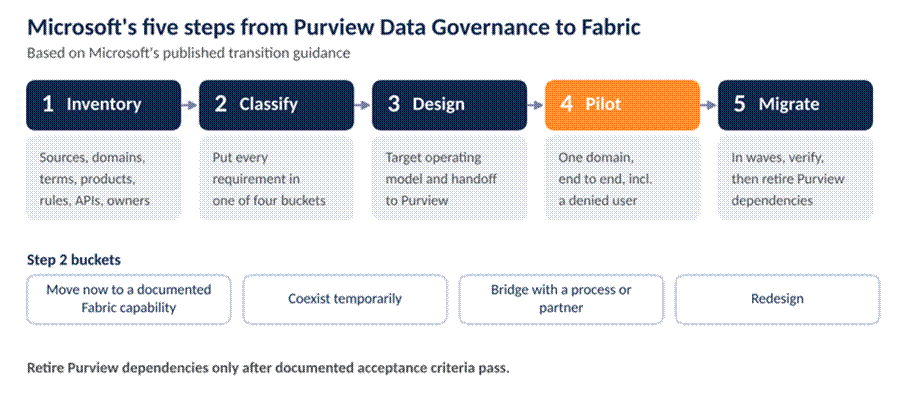
Figure 2. Microsoft’s recommended migration steps. Source: Microsoft transition guidance, November 2026.
Microsoft’s transition guidance sets out five steps: inventory, classify, design, pilot, and migrate in waves. They’re sensible, and the rest of this part follows them closely. For each step you’ll find what it’s for, what to do, what you should have at the end, and a checklist you can lift straight into your project plan. A sixth thread, compliance and evidence, runs alongside all five and has its own section at the end of this part.
Before you start, Microsoft suggests settling four questions early. Which outcomes are regulatory-critical rather than convenience? Which data is already in Fabric? Which Purview objects or APIs are embedded in production? And which labels, DLP rules, audit records and retention rules must continue unbroken? Write the answers down. They will shape every decision that follows.
Step 1: Inventory your Purview footprint
Purpose. Find everything your organisation has built in Purview Data Governance, including the parts nobody remembers building.
Microsoft’s guidance lists what the inventory should cover: sources, scans, collections and domains, owners and stewards, glossary terms and CDEs, custom attributes, data products, lineage, quality rules, workflows, access policies, APIs, reports, licences and retention requirements. Build it as a shared list with one row per item, so that domain owners can review and sign off their own rows.
Use code, not clicks. The Purview APIs let you pull the inventory programmatically and flag the things that matter: assets with no owner, owners who have left, and items nobody has touched in years. Spend real effort on the hidden dependencies. Approval flows, export scripts and reports built on Purview data are the things most likely to break silently, and Microsoft is clear that you shouldn’t assume compatibility with existing Purview API integrations.
Output. A complete inventory held somewhere versioned such as Git, with every item attributed to a domain and an owner.
Checklist
All Data Map sources listed, with non-Fabric sources flagged
Domains, collections, owners and stewards recorded
Glossary terms, CDEs and custom attributes exported in a portable format
Data products, quality rules and access policies listed
Workflows, API integrations and reports that depend on Purview identified
Licences and retention requirements captured
Stale and unowned items flagged
Inventory stored in a versioned location
Step 2: Classify every requirement
Purpose. Decide the fate of every item in the inventory before anyone builds anything.
Microsoft suggests four buckets: move now to a documented Fabric capability, coexist temporarily, bridge with a process or partner, or redesign. If I could add one thing, it would be a fifth: leave it behind. A migration is the cheapest moment you’ll ever get to clean up. Dead glossary terms, abandoned data products and assets nobody has touched in years don’t become more useful by being moved. Record why you’ve left them and let them go.
This is also the point to make your catalog strategy decision. If most of your governed data is in Fabric, or can reasonably be brought there, the OneLake catalog may well be enough. If a substantial share sits in systems that will never connect to OneLake, you’ll need something that spans both, and Microsoft’s named partners come into the conversation. Make this decision now. Deciding it in month eleven means a second migration.
Use Table 2 as your guide. For each redesign item, take Microsoft’s note as the starting point. Glossaries and CDEs: export and preserve terms, then put definitions into table and column descriptions and tags. Data products: define the contract, lifecycle and access process outside the catalog where needed. Data quality: move rules into pipelines, where they can stop bad data before it lands. Lineage: keep another method only where someone genuinely relies on cross-system or column-level lineage.
Output. A decision against every inventory row, signed off by the relevant domain owner, plus a documented catalog strategy.
Checklist
Every item assigned to move, coexist, bridge, redesign or leave behind
Reason recorded for every item left behind
Catalog strategy agreed: OneLake catalog alone, or with a partner
Redesign owners named for glossary, data products, quality and access workflows
Regulatory-critical items flagged for the compliance workstream
Domain owner sign-off obtained
Step 3: Design the target operating model
Purpose. Agree how governance will work in Fabric, and who does what, before you change a single setting.
The most important change here isn’t technical. Governance in Fabric happens where engineers work, so the operating model must move there too. Microsoft’s guidance says the design should cover domains and subdomains, workspace and capacity topology, delegated admins, item owners, certifiers, tag taxonomy, OneLake roles, any Fabric Policies, and the handoff to Purview for security and compliance. It also makes a point I’d underline twice: business and enterprise architects should lead domain design, with Fabric admins implementing it.
Roles
Microsoft Learn describes three roles around domains. Fabric admins create and edit domains, appoint domain admins and contributors, and assign workspaces. Domain admins, typically business owners or subject-matter experts, manage their domain’s description, contributors, workspace assignments and delegated settings. Domain contributors are workspace admins authorised to assign their workspaces to a domain. Around those sit certifiers, item owners and the workspace admins who decide who builds.
I’d go one step further. Keep the Fabric administrator out of governance decisions as far as possible. The admin runs the platform. The business decides ownership, promises and labels. If you blur that line, every badge, label and access request ends up queuing behind one very busy person.
Domains
A Fabric domain groups data logically, usually by business area. Assign a workspace to a domain and all its items come with it, and users can then filter the OneLake catalog by domain. Subdomains refine the grouping and are managed by the parent domain’s admins. Domain admins have meaningful power: they can override delegated tenant settings, set a default domain for nominated users and groups, set a default sensitivity label, and control certification for their domain. Decide deliberately which settings the platform team keeps and which each domain controls.
Domains organise; they don’t secure
This distinction catches people out more than any other, so it’s worth stating plainly. Domains do not control access. Microsoft Learn is explicit that domain assignment doesn’t affect item visibility or accessibility for tenant users. Discovery, visibility and access depend on workspace roles and item permissions, not on which domain a workspace sits in. All users in the tenant can also see all domains, regardless of their domain roles.
In Purview, governance domains were often treated as a boundary. In Fabric they are an organising and filtering layer. If your Purview design used domains to imply who could see what, that intent now has to be expressed through workspace roles, item permissions and OneLake security. Moving a sensitive workspace into a “restricted” domain changes nothing about who can open it.
Endorsement and tags
Endorsement is how Fabric signals trust, and it’s the natural successor to much of what data products did in Purview. Promoted means the creator thinks an item is ready to share and reuse, and anyone with write permission can apply it. Certified means an authorised reviewer has confirmed it meets your quality standards. Master data marks an item as the authoritative single source of truth for something like customer lists or product codes. Certification and master data both must be enabled by a Fabric admin, and only nominated people can apply them. Certification can be delegated to domain admins, so each domain can appoint its own reviewers. That’s exactly the pattern I’d recommend let each domain own its badge rules and publish those rules somewhere requesters can find them.
Tags are where much of your old classification and custom attribute work will land. Fabric admins create tenant-level tags, and Fabric or domain admins can create domain-level tags. Items and workspaces can each carry up to 10 tags, and a tenant can hold up to 10,000 unique tags. Ten tags per item sounds generous until you try to map a sprawling Purview taxonomy onto it, so use the transition to consolidate.
Access: get the security model right
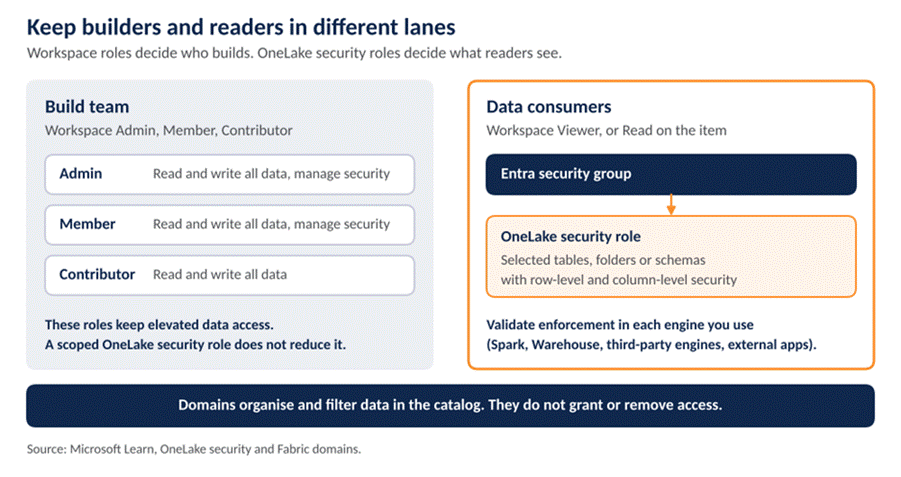
Figure 3. Separating builders from readers in Fabric. Based on Microsoft Learn guidance on OneLake security and Fabric domains.
This is the area where we see the most avoidable risk, and one point needs to be explicit in your design. Microsoft’s OneLake security documentation says that workspace Admin, Member and Contributor roles retain elevated data access in that workspace. Adding one of those users to a narrower OneLake security role does not remove the broader permissions already granted. For data held directly in the source workspace, a three-table role therefore does not limit a Contributor to three tables. Shortcuts need separate analysis: elevated access in a consumer workspace does not itself grant elevated access to data in the producer workspace, and the engine’s identity mode also matters.
In practice, scoped OneLake roles are most useful for users who have Viewer access or item Read permission rather than elevated roles in the source workspace. We still regularly find report consumers given Contributor access “just so they can see the report”. For data held directly in that workspace, this grants much broader access than a consumer needs, and adding a narrower OneLake role does not take that access away. For shortcuts, validate source permissions and the engine’s identity flow separately.
Microsoft’s recommendations are sensible and worth following carefully. Use security groups for workspace roles. Give consumers access to individual items where possible, or the Viewer role when they need workspace-wide visibility, together with the required OneLake security roles. Keep Admin, Member and Contributor for people who genuinely need their broad workspace capabilities. For supported lakehouse scenarios, scoped OneLake ReadWrite roles can let users write selected tables or folders without granting Contributor; these roles cannot include row-level or column-level security constraints. Review the DefaultReader role and ReadAll permissions so they do not defeat intended restrictions. Turn on OneLake diagnostics to audit data access and use the Fabric audit log for control-plane changes.
Validate security engine by engine
The second point to make explicit is that security behaviour depends on how data is reached. For a SQL analytics endpoint, check its access mode before relying on OneLake security: User’s identity mode evaluates the signed-in user’s OneLake permissions, while Delegated identity mode uses an owner identity and SQL permissions. A change of mode interrupts running and queued queries across the workspace’s SQL analytics endpoints, so plan it as an operational change. Validate the applicable controls and identity flow for every engine. Three cases deserve particular care:
Shortcuts. Access depends on permissions at both the shortcut path and the target path, together with the shortcut’s authentication model and the querying engine’s identity mode. For internal shortcuts using identity passthrough, source permissions remain important; delegated paths can access the target using an owner’s or connection identity. Test the actual source, consumer and engine combination rather than assuming that only the source lakehouse’s roles matter.
Third-party engines. External engines can register as authorised engines and enforce table permissions, row-level and column-level security at query time, but this capability is in preview.
Apps outside Fabric. Access depends on the tenant setting that allows users to access OneLake data with apps external to Fabric, and that setting must be enabled to use shortcuts with OneLake security.
Don’t assume that a role tested in one engine behaves the same in another. Build engine-by-engine tests into your design and your pilot, using the identities and tools your users actually work with.
For access requests, Microsoft’s mapping points to item sharing, semantic model access requests and source controls, and recommends keeping approval, expiry, revocation and evidence processes wherever Fabric doesn’t cover them end to end. Many organisations will find Microsoft Entra ID Governance a natural home for that: one Entra group per data product, tied to a OneLake security role, with access packages handling approval and expiry.
Engineers will do most of the governing
In Fabric, engineers can capture technical descriptions and propose labels as part of building data products, while business owners and stewards remain responsible for agreed meaning, appropriate use and approval standards. Fabric endorsement applies to supported items, such as a lakehouse or semantic model, rather than automatically certifying each table inside them. We’d recommend that every published table has an owner, a consumer and a promise, with that accountability agreed explicitly. In a medallion architecture, the team landing bronze and the teams producing silver and gold may take different responsibilities, but the architecture itself does not assign business ownership. Pairing engineers’ technical knowledge with stewardship at delivery time is stronger than leaving either group to reconstruct the context later.
Output. A documented target operating model, approved by domain owners and your data protection lead.
Checklist
Domains and subdomains designed around business areas, led by business architects
Fabric admin, domain admin, contributor, certifier and owner roles named
Delegated tenant settings agreed between platform team and domains
Badge rules published for each domain
Tag taxonomy consolidated within the 10-per-item limit
Access model distinguishes broad workspace administration and building from scoped item access, with OneLake Read or supported ReadWrite roles assigned on a least-privilege basis
Design confirms domains are not used as an access boundary
Engine-by-engine security tests defined, including shortcuts and external apps
Access request, approval, expiry and revocation process designed
Handoff to Purview for labels, DLP and audit documented
Step 4: Pilot one end-to-end scenario
Purpose. Prove the design works on one real domain before you scale it.
Microsoft’s guidance is specific here, and rightly so. Pilot one domain, one critical asset, a producer, a consumer, a denied identity, and an analytics or AI use case. Test discovery, context, lineage, access, labels, DLP, audit and remediation. And confirm that denied access is actually blocked.
That last point is where the security clarifications above earn their keep. Include a user with an elevated workspace role and a separate user with item Read permission plus a scoped OneLake security role. A OneLake role alone is not a substitute for the item access required to connect. Test both identities in every engine your consumers use, including the configured SQL endpoint mode and any shortcut paths. Check that domain assignment has not been relied on to restrict anyone. Involve your auditor or DPO in the sign-off. It’s far easier to adjust an evidence trail during a pilot than after go-live.
Output. Documented acceptance criteria, and evidence that the pilot domain meets them.
Checklist
Pilot domain, critical asset, producer and consumer chosen
Denied identity tested and access confirmed blocked
OneLake security roles tested in each engine in use, including shortcuts
Workspace role holders confirmed as builders only
Discovery, descriptions, lineage, labels, DLP and audit tested
Analytics or AI use case tested against governed metadata
Acceptance criteria documented and signed off, including by the DPO
Step 5: Migrate in waves and verify
Purpose. Move every domain onto the new model, running old and new processes in parallel only as long as needed.
Move domain by domain. Migrate ownership and supported metadata, move quality rules into pipelines, switch access requests to the new process and train people in Explore. Stop a Purview scan only after its discovery, classification, lineage, reporting and evidence dependencies have been assessed and their replacements accepted; a domain going live is not sufficient on its own. Plan the waves around your business calendar. Nobody will thank you for migrating Finance during year-end close. Retire Purview dependencies only after documented acceptance criteria pass, and require each wave to meet the relevant criteria proved in the pilot.
Output. All in-scope governance requirements operating in their agreed destinations, whether Fabric, a complementary catalogue or a documented business process; Purview Data Governance dependencies removed; and required evidence retained.
Checklist
Wave plan agreed and aligned to the business calendar
Ownership and supported metadata migrated per domain
Quality rules running in pipelines
Access requests switched to the new process
Users trained in Explore and domain owners in Govern
Purview scans stopped per domain only after all dependent outcomes have accepted replacements and required historical evidence has been retained
Each wave passes the pilot acceptance criteria
Remaining Purview governance integrations removed before 12 November 2027
Running alongside: the compliance and evidence workstream
Time for the auditor’s hat. For organisations subject to the UK GDPR and EU GDPR, the question isn’t really “which catalogue?”. It’s “can we still demonstrate compliance once this has moved?” The accountability principle in Article 5(2) requires a controller to be responsible for, and able to demonstrate, compliance with the data protection principles. In audit after audit, we find that a governance catalogue has become part of that demonstration, even though nobody ever designed it that way.
Where catalogues quietly support compliance
Records of processing (Article 30). The record usually lives in a privacy tool or a spreadsheet, but the link between a processing activity and the actual systems and tables is often evidenced through catalogue metadata.
Data minimisation and purpose limitation. Glossary terms, critical data elements and classifications help show what personal data is held, why, and where it goes.
Data protection by design (Article 25). Domain ownership, product definitions and access workflows show that privacy was considered when data products were built.
Security of processing (Article 32). Access controls, labels and audit logs evidence appropriate technical and organisational measures.
DPIAs and data subject rights. Lineage helps answer where personal data flows, which matters for impact assessments, erasure requests and subject access requests.
These five areas do not divide neatly between retiring governance tools and retained security and compliance tools. Catalogue metadata, access controls, approval records and audit logs can contribute to several of them. Map each obligation to the evidence and controls your organisation actually uses, then identify which dependencies change with the retirement.
What changes for your evidence
Nothing in the retirement changes your legal obligations. What changes is where some evidence comes from and who produces it. Domain defaults and inheritance can support consistent labelling, but they do not replace content discovery or prove that sensitive data has been classified correctly. Validate the replacement for each scanning and classification dependency. Access evidence moves to wherever you rebuild approvals, so check that those records are retained for as long as you need them. Lineage coverage may differ, which feeds straight into DPIAs and erasure handling. And glossary definitions that carried classification logic need the same rigour and approval when they become descriptions or tags.
Article 32 evidence also needs refreshing in light of the security model. If your access control evidence assumed that a scoped role limits what someone can see, check whether any of those people also hold Admin, Member or Contributor roles. If they do, the scoped role isn’t the control you think it is.
Keep the history
If a regulator asks in 2028 how a dataset was classified in 2025, will you still be able to answer? Before retirement, export and retain the governance metadata you may need as historical evidence: glossary terms and their approvals, classifications, data product definitions, access policy configurations and workflow decisions. Store it somewhere durable and versioned, with a retention period you can justify.
If you take one message to your audit committee, make it this one. The retirement is a change to your control environment, and it should be managed like one: a documented decision for every control that relied on Purview Data Governance, a named owner, a target date, and evidence that the replacement works before the old control is removed.
Checklist
Controls that rely on Purview Data Governance identified
Records of processing and DPIAs updated where the evidence source changes
Historical governance metadata exported and archived
Audit committee briefed on the control change
PART 4
Plan, questions and support
A twelve-month transition roadmap
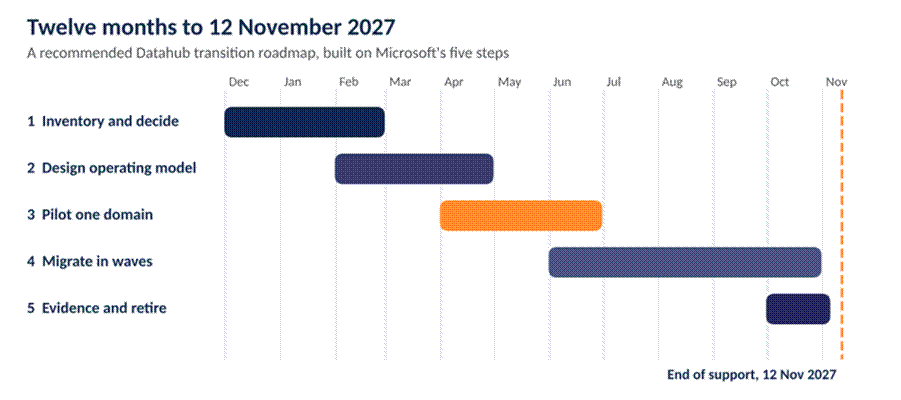
Figure 4. A recommended roadmap to 12 November 2027, built on Microsoft’s five transition steps.
Twelve months sounds generous. It isn’t, once you allow for year-end freezes, audit cycles and the time it takes to get busy business leaders to agree who owns what. This is the phasing we’re recommending to clients.
Phase
Timing
Transition step
Gate to pass
1. Inventory and decide
December 2026 to February 2027
Steps 1 and 2
Inventory complete, every item decided, catalog strategy agreed
2. Design the operating model
February to April 2027
Step 3
Design approved by domain owners and data protection lead
3. Pilot one domain
April to June 2027
Step 4
Acceptance criteria passed, denied access confirmed blocked in every engine
4. Migrate in waves
June to October 2027
Step 5
Each wave passes the pilot criteria
5. Evidence and retire
October to early November 2027
Compliance workstream
Every Purview-dependent control has a working, evidenced replacement
Table 3. Recommended phases and gates. Datahub recommendation built on Microsoft’s transition steps.
If you’re reading this in the middle of 2027, don’t panic. Compress rather than skip: use four weeks for inventory and decisions and six for a focused pilot as planning targets, not guaranteed delivery times. Defer only non-critical improvements until after cutover. Required access controls, compliance evidence, discovery and operational dependencies need accepted replacements before the old processes are switched off. Historical evidence export is essential, but it is not a substitute for working controls.
Datahub can run this roadmap with you, or for you Some clients want us to lead the whole programme. Others want a design review, a pilot, or an extra pair of hands for the migration waves. We’ll fit around whatever roadmap you choose and bring Fabric engineering and data protection expertise to the same table. Talk to Datahub about your OneLake catalog roadmap.
Questions we’re being asked
Is Microsoft Purview being retired?
No. Only Purview Data Governance is retiring. Purview’s data security and compliance capabilities, including sensitivity labels, DLP, Audit, Insider Risk Management and AI governance, continue, and Microsoft says it will keep investing in them.
Will our Purview governance account stop working tomorrow?
No. Existing capabilities stay in maintenance mode until 12 November 2027. You can’t create new accounts, and you shouldn’t expect new features. Use the time to plan rather than to extend.
We’ve just started a Unified Catalog project. Should we stop?
Stop building new things in Purview, but don’t throw away the thinking. Domain design, ownership, glossary definitions and data product contracts all carry over. Redirect the project towards the Fabric operating model and keep your definitions portable.
Can we use domains to restrict access to sensitive data?
No. Domains organise and filter data in the OneLake catalog; domain assignment does not determine who can see or open an item. Use workspace roles, item permissions and OneLake security roles. Admin, Member and Contributor retain elevated access to data held directly in their workspace, and a narrower OneLake role does not remove it. That elevated role does not automatically grant equivalent access to a shortcut’s source in another workspace; validate the source permissions and querying identity as well.
Do we have to move all our data into OneLake?
No. Some supported data can remain in its source and be accessed through shortcuts or metadata mirroring. Database mirroring is different: it creates a replicated copy in OneLake. The right pattern depends on the source, workload and governance requirements. Sources that are not exposed through supported Fabric integration patterns need a separate discovery and governance approach.
Will governance cost more or less?
The OneLake catalog’s governance capabilities are included in Fabric capacity rather than billed through separate catalog meters. That does not automatically stop charges for your existing Purview governance deployment during coexistence. Some Purview protection features used with Fabric still need additional licensing. Compare the cost of the target Fabric estate, any partner tools and retained Purview services, together with the migration and overlap period. An assessment should establish your total cost rather than assume a saving.
We’re in a regulated industry. What should we do first?
Contact your Microsoft account team now, as Microsoft recommends. In parallel, identify which of your documented controls rely on Purview Data Governance, and treat the transition as a control change with owners, target dates and evidence.
Does this affect Copilot and AI agents?
Yes. Microsoft positions governed data as a foundation for AI, and supported Fabric integrations can expose data and metadata to Copilot and agents. Permissions, labels and other governance signals have different roles, and their effect depends on the supported access path and configuration. Better descriptions can improve an agent’s context, but they do not guarantee accurate answers. Test the actual agent’s identity, data access, metadata use and answer quality.
Datahub can support any transition to the OneLake catalog
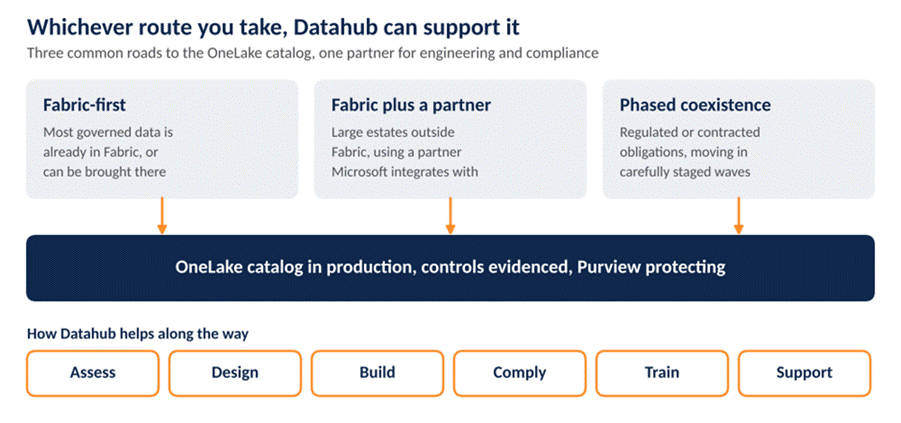
Figure 5. Three common routes to the OneLake catalog, and where Datahub helps.
There’s no single right way to make this move. A Fabric-first organisation with most of its data already in OneLake will take a very different route from an organisation with a large estate outside of Fabric. Some will move quickly. Some will run old and new side by side for a while.
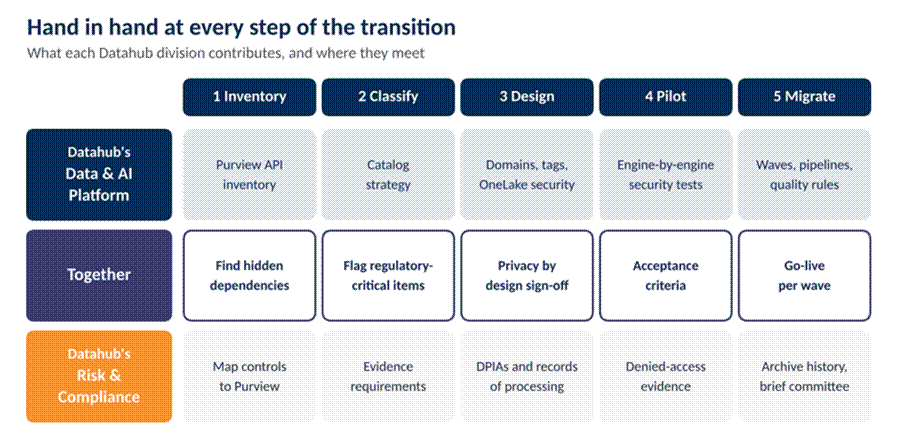
Whichever route you take, we can support it. Datahub was built around a simple idea: engineering and compliance under one roof. Our Data & AI Platform division designs and builds data platforms and specialises in Microsoft Fabric and Power BI. Our Risk & Compliance division audits data protection controls across the UK, Europe and beyond. This transition sits squarely between the two, and that’s exactly where we work.
Figure 6. Datahub’s two divisions working hand in hand at every step of the transition.
How we can help at each step
Transition step
How Datahub helps
Step 1: Inventory
Purview governance inventory using the Purview APIs, finding stale, unowned and hidden dependencies
Step 2: Classify
Decision workshops with domain owners, and an independent view on whether the OneLake catalog alone is enough
Step 3: Design
Fabric governance design: domains, roles, endorsement, tags, OneLake security, access requests and the Purview handoff
Step 4: Pilot
End-to-end pilot build, including engine-by-engine security testing and acceptance criteria your auditors will recognise
Step 5: Migrate
Hands-on migration waves, metadata-driven pipelines, data quality rules as code and data product contracts in Git
Compliance workstream
Compliance impact assessment covering controls, records of processing, DPIAs and evidence retention
Throughout
Training for engineers, stewards and domain owners by Microsoft Certified Trainers, plus ongoing support
Datahub are a Microsoft Partner and we work with Microsoft data platforms of clients on every project. With offices in Leicester, London and Madrid, we support clients across Europe, the Middle East, Africa, Asia, and the Americas.
If you’d like to talk through where your organisation stands, get in touch. We currently have 12 months where we can create a plan to migrate your governance to the OneLake catalog.
Closing thoughts
The retirement of Purview Data Governance isn’t the end of governance in the Microsoft world. It’s a relocation. Governance moves from a separate catalogue that described the data from a distance into the platform where data is built, shared and used, by people and by AI.
That’s mostly good news. Creating and maintaining metadata alongside the data can reduce duplication, especially when engineers and stewards agree descriptions as part of delivery. Including catalog capabilities in Fabric capacity can also simplify the commercial model, although transition costs and retained services still need budgeting. But this isn’t a like-for-like move. Glossaries, data products, quality rules and access workflows all need a new shape. The security model needs to be understood properly, including the elevated access that a scoped OneLake role does not remove within the source workspace. And for anyone with regulatory obligations, the evidence that used to sit quietly in Purview needs a deliberate new home before November 2027.
The organisations that come through this well will treat it as a governance programme rather than a tooling migration. They’ll start with people and ownership, use the move to tidy up rather than copy everything across, keep their definitions portable, and prove each new control before switching the old one off. If you’d like help doing that, you know where we are.
Get in Touch
The first step does not need to be complicated. It would not cost you anything to start a conversation with our team.
Contact Our Team
No pressure. No obligation. Just a professional conversation focused on helping your organisation understand your data landscape and what you want to achieve.
Contact Datahub Consulting today to begin the conversation and take the next step towards stronger data platform.
This guide reflects the information available at the time of writing in November 2026 and is provided for general guidance. Information can change over time like product capabilities, licensing, and transition guidance. No commitment is made to update this article. Before planning or carrying out a migration from Purview Data Governance to the OneLake catalog, consult the latest Microsoft documentation and validate the requirements for your environment. The data protection discussion is not legal advice.
Features marked as “preview” have not yet reached general availability (GA), and their functionality may change during the preview period.
Microsoft sources
The Microsoft publications below support the product announcements and technical descriptions in this article. Opinions, implementation recommendations and proposed timelines are Datahub’s own. The data protection discussion is not a statement of Microsoft guidance or legal advice; it needs to be read alongside the applicable legislation and current regulator guidance.
The following Information Commissioner’s Office guidance supports the UK GDPR accountability, data protection by design and processing-records discussion in this guide. The Information Commissioner’s Office is the UK Supervisory Authority for the UK GDPR (UK Data Protection Act 2018).
ICO: Guide to accountability and governance accountability under Articles 5(2) and 24, ongoing review of measures, and the relationship between policies, records, security and DPIAs.

 310
310